
AI Page Builder
Croster AI Page Builder allows you to use AI to generate and edit pages directly from Croster Page Manager. Configure an AI provider, select the model you want to use, and then use Create with AI to generate new pages or Ask AI to edit an existing page.
Enable this option to configure an AI provider and use Create with AI in Page Manager. Once enabled and properly configured, the Create with AI option becomes available in Page Manager.

Once enabled, you can configure provide, AP key and other options.
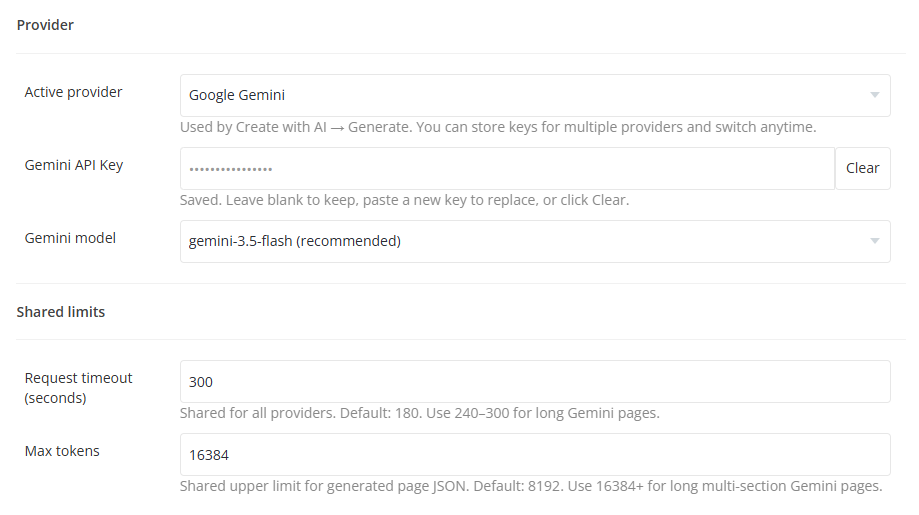
The Provider section allows you to configure the AI service used by Croster AI.
Select the AI provider that will be used by Create with AI → Generate. Croster can store API keys for multiple supported providers, allowing you to switch between providers when required.
The currently selected provider is used for generating AI-powered pages.
Enter the API key provided by your selected AI provider. The API key is stored securely by Croster and is used when generating content through the AI Page Builder.
If an API key is already saved:
- Leave the field blank to keep the existing key.
- Enter a new key to replace the existing key.
- Click Clear to remove the saved key.
Select the AI model that should be used for page generation. The available models depend on the selected provider.
For example, when Google Gemini is selected, Croster provides the supported Gemini models available for AI page generation.
The Shared Limits section controls common limits used by the configured AI providers.
Defines how long Croster will wait for a response from the AI provider before the request times out. The default value is 180 seconds. For larger or more complex AI-generated pages, a longer timeout may be required.
For example, the recommended range shown for long Gemini page generation is 240–300 seconds.
Defines the maximum number of tokens allowed for the generated page JSON. The default value is 8192 tokens. For longer pages containing multiple sections, a higher value such as 16384 or more may be required.
Note: Higher token limits can allow the AI to generate longer and more complex pages, but the actual output also depends on the selected AI model and its capabilities.
After configuring the AI provider, API key, model, and limits, save your settings to apply the configuration.
Once the AI Page Builder is enabled and the provider is configured, you can open Page Manager and use Create with AI to generate a new page or Ask AI to edit the current page.